Thursday, May 5, 2011

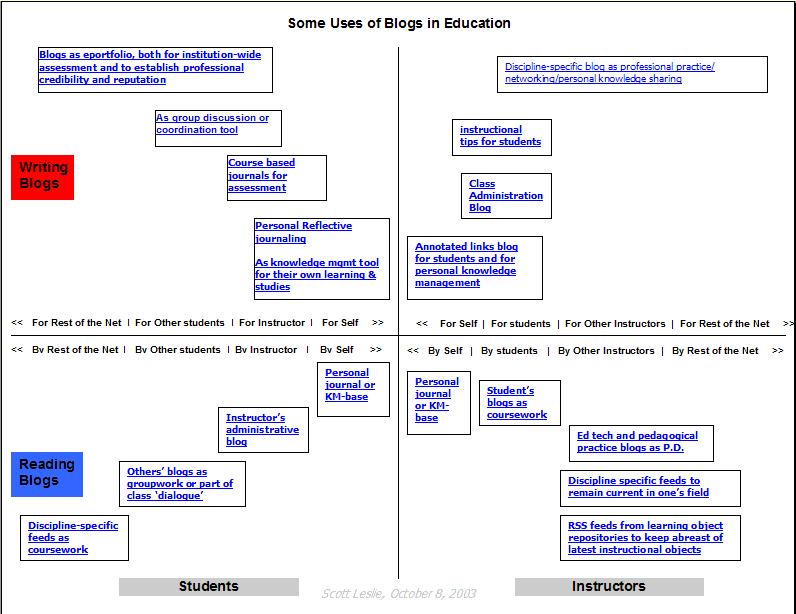
Blogs in Education

Blogs in Plain English


Here are some Blogging in Education  links.
Top 10 Reasons to Use a Blog in the Classroom


And, just for fun...

Tuesday, August 24, 2010

Using Google Street View as an Inspiration for Art

I'm always fascinated by the creative ways in which people apply technology.  Recently, I came upon a CBC article on The Virtual Paintout, a blog which challenges artists from around the world to visit a particular geographic location in Google Street View and then re-create a scene from that location and submit it to the blog.  The rules of the challenge are very specific; the scene must be found on Google Street View.

The current challenge is to paint a scene from Prince Edward Island.  Some of the results are quite remarkable.

This got me thinking that it would be quite possible, with very little effort, to implement a similar challenge in an Art classroom.  The teacher could set up a blog, issue the challenge, and post students' work as it is submitted.  In that way, family and friends could view the student work with very little concern about personal safety or privacy issues.  The teacher could allow visitors to comment, but monitor the comments but moderating them.

To expand the idea even further, the project/challenge could involve multiple classrooms from various schools, allowing students to share their work with other students and comment on one another's work.

I think too often when we consider incorporating technology into the Art classroom, we get stuck on the idea of technology as the medium of creation.  We can expand the possibilities considerably by instead seeing it as the medium of distribution.

Monday, July 26, 2010

Googlelookup Function Does Amazing Things in Google Spreadsheets

Discovering this one was one of those "Holy Cow!" moments for me.  You can insert your own exclamation once you try it out.

Normally we think of spreadsheets as tools for performing mathematical calculations and logical operations.  Certainly this is the original realm of spreadsheets, but over the years they have expanded into much more powerful - and versatile - tools.  Google has taken that expansion one step further with the Googlelookup() function.

The basic format of the function is googlelookup("entity","attribute")

So, if you were to type into a cell =googlelookup("Marlon Brando","Birthday") the cell would return 3 April 1924.

Better yet, you could type Marlon Brando in cell A3 and then create the formula =googlelookup(A3,"Birthday) and get the same result.  That would allow you to copy the formula down column B.  Now, if you typed Sarah Palin in A4, B4 would return 11 February 1964.  If you typed Jimmy Smits in cell B5, C5 would return 9 July 1955.

Here is just a smattering of the types of things you can look up with Googlelookup:

  • Ages of famous people
  • Heads of state of countries
  • GDP of countries
  • Population of countries
  • Atomic numbers and weights of elements
  • Statistics of famous athletes
  • Details of dinosaurs (weight, size, ...)
  • Statistics of planets and other heavenly bodies
The classroom applications of this are really limited only by the imagination.

Wednesday, June 30, 2010

The Last Post

Alas, the title proves that you can take the English teacher out of the classroom, but you can't excise his penchant for bad puns and double entendres.

This is not a lament.  And, it is certainly not a complaint.  It is, however, the last official post to the Tech Tips blog.  Today will the last day for the Elearning team.  If or when an Elearning department re-emerges, it will no doubt take a very different form than it has had over the past four years.

Wednesday, June 23, 2010

Google Docs Now Provides Free PDF Conversion

Just last week, I had a request from someone who wanted to convert and existing PDF to an MS Word file so that students could complete the forms that the document contained on the computer rather than with pen  and paper.

As luck would have it, Google just announced today that users will now have the choice to fully convert PDFs to Google Docs when they upload them.  Furthermore, they have added the ability to perform Optical Character Recognition on a PDF which began as a scanned document.  This is a huge announcement.

Thursday, June 17, 2010

Tying Up Loose Ends and Putting Things on the Shelf

As most of you are probably aware, at the end of this school year the Elearning department - at least in the form it has taken until now - will cease to exist.  Therefore, I thought I would spend some time ensuring that those who have made use of some of our work in the past can continue to do so in the coming year.

Thursday, June 10, 2010

Using Audacity and Photostory in the French Classroom

Qu'est-ce que c'est L'audacity?  L'audace?

I probably should open by saying, "Pardon my French."

I recently did some work with a grade nine French class in Audacity, an open-source sound editing software package.  The teacher had given the students a topic on which they were to create a short French dialogue/skit.  The skit involved incorporating sound effects, so they also listed these in their scripts.  My involvement began after the scripts were already complete.

Get Your Morning Dose of Java (Math Applets)

In response to my previous post regarding Igeom, the interactive Geometry applet, John Cazakoff of Shaunavon High School directed me to  mathopenref.com, a site which hosts a number of online interactive applets covering many common geometry concepts.  The site is an excellent supplement to the regular math classroom.  Its strength lies in its activities for plane geometry, but it does have some resources for cartesion/coordinate geometry and solid/3D geometry as well.

Each of the applets at mathopenref.com tackles a specific concept and is accompanied by an explanation of the concept illustrated.  In this way, it differs from Igeom, which is more of an open-ended erector set that allows teachers and/or students to create their own interactive systems.

Thanks, John, for bringing this resource to my attention.

Thursday, June 3, 2010

Bill C-32 - Why You Should Care

Yesterday the Federal Government introduced Bill C-32, an attempt to re-write copyright legislation to acknowledge and deal with the age of digital content.  Why should you care?  Well, as a consumer - but more specifically as an educator - C-32 has some significant ramifications for everyday life.

Tuesday, June 1, 2010

Using Google Forms to Track Student Behaviour

I've blogged in the past about using Google Forms and Google Docs to create online forms which feed data to a spreadsheet, where it can be compiled, analyzed, and graphed.

Recently, I've done some work with a school to create an online student behaviour tracking form.   I think this is an excellent example of tapping the power of Google Docs for a very practical educational purpose.

 Here is how the system works:

Alberta School Opens the Door to Ipod and Smartphone Use

This morning CBC is reporting on an Edmonton area school which plans to experiment in the fall with allowing students to use Iphones and Ipod touches to access the Internet.  Students will be expected to disable the actual phone and texting capabilities of their Iphones and connect via the school's wireless network.  And the school plans to block certain web sites to rein in some types of connectivity.

I will be curious to see how this experiment pans out.  I have to confess that I'm somewhat ambivalent to the enterprise as it's being proposed.

Monday, May 31, 2010

Shedding the MS Shackles with Open Office

As the end of the year draws near, I've decided to look back through the Tech Tips Blog posts to see if I left any glaring omissions that ought to be addressed before I draw the curtain on this enterprise.  And I found a big one. I realized that in all my previous posts I have made almost no mention of Open Office.

Open Office is a full-fledged office suite of applications which rivals Microsoft Office in its capabilities.  Furthermore Open Office is entirely open source, which means that it's free to download, use, and re-distribute. Open Office is a great alternative for those who don't want to fork over several hundred dollars on MS Office.  It's also a great choice for students going off to university.  When you consider that students can purchase a capable netbook or small laptop computer for $300 to $550, it's hard to justify having to spend $150 more on MicrosoftOffice, Home and Student.

Using Igeom to Examine Angle Relationships

I had a recent request from a grade nine math teacher who was wondering if I could suggest interactive geometry software to support the unit on circle geometry. (Unit 8 in the Pearson Math Makes Sense text).  A quick perusal of resources turned up Igeom, a free Java applet created in Brazil and available for download on the Internet.  Igeom is relatively easy to use after a bit of instruction, and it's extremely portable.  A teacher can put the applet on a network share (such as handouts) for students to access, or it's small enough that students can copy it to their home folders and run it from there.

Wednesday, May 19, 2010

More Photo Fun

Back in December I drew attention to bighugelabs.com, a website that allows the user to take a photo of herself and place it within a relatively professional-looking context: a magazine cover, CD cover, Andy Warhol pop-art poster, motivational poster and more.

This week my colleague Rob Geiger has passed on a few more web sites which perform similar magic.  Each has its own strengths - and weaknesses. Here's a run-down.

Capturing Streaming Audio in Audacity

One of the most rewarding things about working as an Elearning Catalyst Teacher is learning new technologies and new ways of using old technologies.  I'm sure some folks just assume we were born with the background required for the job, but in actual fact, we're frauds; most of the ideas we bring to the table we've learned from the teachers and students we work with.  So, credit for this Tech Tip goes to the students of Vanguard School, who showed it to my colleague Rob Geiger, who then passed it on to the rest of us.

Frequently, when students are creating a PowerPoint or other multimedia presentation, they want to accompany it with music.  All too often when we ask them if they have the song they want to use on hand, the answer is, "Yeah, right here on Youtube."  In the past, members of Elearning have advised students that incorporating streaming audio from the Internet into a PowerPoint presentation is simply too difficult to bother with.  This tech tip changes that.

Tuesday, May 18, 2010

Facebook Privacy - Revisited

Further to our previous posts on Facebook privacy, I recently encountered two web sites which allow users to automatically scan their Facebook privacy settings and correct those settings that present privacy risks.

  • Reclaimprivacy.org provides scripts which examine a user's Facebook privacy settings.  To do this, the user creates a bookmark/favorite for the script link, then logs into Facebook and visits his/her privacy settings.  Clicking on the script bookmark then runs the scripts, which report any issues.  Users can then choose whether or not to correct the identified "problems."
  • Saveface, a service from the folks at Untangle (the site-blocking software that you have no doubt had the occasion to swear at when it prevents you from visiting a web site at school) provides much the same service as reclaimprivacy.org.  Unfortunately, Saveface takes a no-holds-barred, heavy-handed approach similar to its parent (Untangle).  The scripts provide no opportunity for user intervention or input; they simply change all settings to "Friends Only." In my case, I had travel photos which were in no way of a personal nature; therefore, I had set these albums to "Everyone."  Saveface self-righteously assumed it knew better and changed these settings without asking for confirmation.
In short, I would recommend reclaimprivacy.org for folks who find navigating the labyrinth of Facebook privacy settings a bit intimidating.  

Saveface may have a place for parents to set their child's privacy settings quickly and easily; however, I think there is merit in going through privacy settings with your child so that he/she can gain an appreciation for what's involved.  For most users, I wouldn't recommend it.

Protecting Your Gmail Account

As cloud computing grows in popularity and we do more work with internet-based applications (such as Gmail and Google docs), the need for good security practices increases. Google’s suite of applications is just one of those incredibly useful sets of tools that makes cloud computing so attractive. Because all of Google’s applications are accessed using the same username and password (your Gmail account), if someone gets access to your Gmail account, then they have access to all your Google-based information. The best way to protect your account it to understand how someone might get your account information.

Friday, May 14, 2010

Gmail Adds Drag & Drop Images

Not that long ago, Google added the ability to add in-line images to Gmail messages.  Before that, users could only attach images to messages.

Now Google has enhanced Gmail's handling of images by allowing users to drag and drop images directly into the compose window.  Users can simply drag an image directly from a folder window into their message.  One word of caution, though.  Images should be re-sized to dimensions appropriate for displaying within an email before adding them to the compose window.

Wednesday, May 12, 2010

Saving Face - How to Manage Facebook in Your Life - Part 3, Kids and Facebook

In Part 1 of this series of articles, we examined the potential privacy risks involved in the social world that is Facebook.  In Part 2, we looked at taking control of Facebook's privacy controls.  In this, the third and final installment, we will examine how we can help our children and students navigate the Facebook universe safely.

Saving Face - How to Manage Facebook in Your Life - Part 2, Taking Control

In a previous post, we examined some of the reasons users should be concerned about their privacy - or lack thereof  - on Facebook. In this post, we will look at how to take control of your Facebook account.

The tutorial below examines the many security, privacy, and notification settings within the Facebook interface.  If you would like to watch this video in a larger format, you can watch it on Youtube.